Build with the libraries
Install a protocol package, then connect, read and forward data.
Installation & examples Read the documentationConnect PLCs, acquire data and forward messages through unified .NET interfaces. Build your industrial application.
dotnet add package Snet.Modbus --version 26.301.1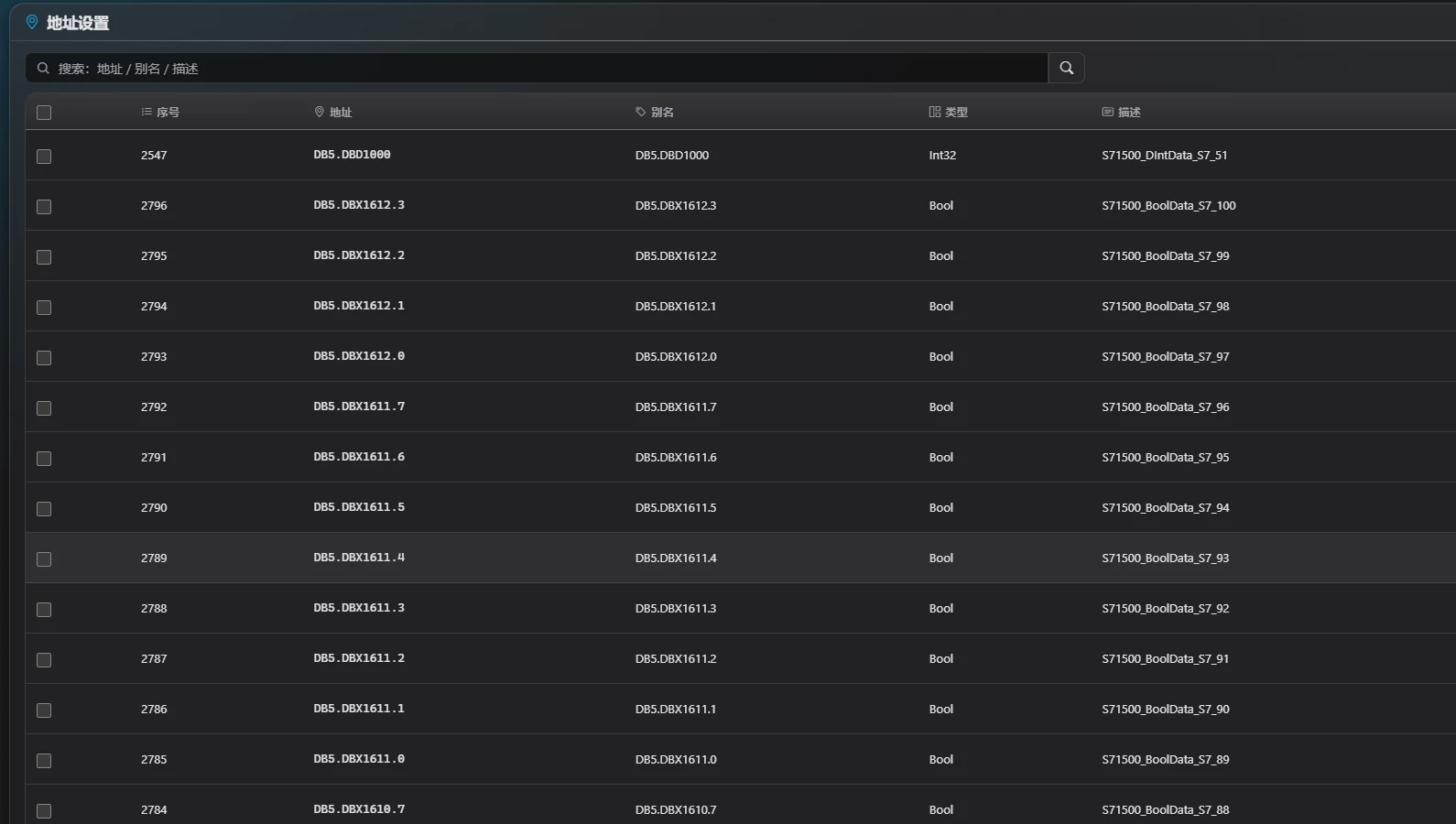
This is the Snet ecosystem hub.Framework website ↗Developer docs ↗
Install a protocol package, then connect, read and forward data.
Installation & examples Read the documentationUse Daq for multi-device acquisition and forwarding, or Debug for communication diagnostics.
Download Daq Download Debug Explore products & sourceConnect, read and inspect the result. Start with real API calls, then choose a driver for your device.
Choose the protocol, then check address rules and data types.
Choose an example and copy it to get started.
dotnet add package Snet.Modbus --version 26.301.1dotnet add package Snet.Modbus --version 26.301.1using Snet.Modbus;
using Snet.Model.data;
using Snet.Model.@enum;
using System.Text.Json;
await using var device = await ModbusOperate.InstanceAsync(new ModbusData.Basics
{
IpAddress = "127.0.0.1", Port = 1502, Station = 1,
ProtocolType = ModbusData.ProtocolType.ModbusTcpNet,
AddressStartWithZero = false
});
var connected = await device.OnAsync();
if (!connected.Status) { Console.WriteLine(connected.Message); return; }
var value = await device.ReadAsync(new Address(new AddressDetails
{
AddressName = "1", AddressDataType = DataType.Short
}));
Console.WriteLine(value.Status ? JsonSerializer.Serialize(value.ResultData) : value.Message);
await device.OffAsync(true);dotnet add package Snet.Siemens --version 26.301.1using Snet.Siemens;
using Snet.Model.data;
using Snet.Model.@enum;
using System.Text.Json;
await using var device = await SiemensOperate.InstanceAsync(new SiemensData.Basics
{
IpAddress = "127.0.0.1", Port = 102,
ProtocolType = SiemensData.ProtocolType.SiemensS7Net_S1200,
Rack = 0, Slot = 1, PDULength = -1
});
var connected = await device.OnAsync();
if (!connected.Status) { Console.WriteLine(connected.Message); return; }
var value = await device.ReadAsync(new Address(new AddressDetails
{
AddressName = "DB1.DBD0", AddressDataType = DataType.Float
}));
Console.WriteLine(value.Status ? JsonSerializer.Serialize(value.ResultData) : value.Message);
await device.OffAsync(true);dotnet add package Snet.Modbus --version 26.301.1
dotnet add package Snet.Mqtt --version 26.301.1using Snet.Modbus;
using Snet.Mqtt.client;
using Snet.Model.data;
using Snet.Model.@enum;
using System.Text.Json;
using System.Text;
await using var device = await ModbusOperate.InstanceAsync(new ModbusData.Basics
{
IpAddress = "127.0.0.1", Port = 1502, Station = 1,
ProtocolType = ModbusData.ProtocolType.ModbusTcpNet,
AddressStartWithZero = false
});
await using var mqtt = await MqttClientOperate.InstanceAsync(new MqttClientData.Basics
{
IpAddress = "127.0.0.1", Port = 1883,
UserName = "", Password = ""
});
var connected = await device.OnAsync();
if (!connected.Status) { Console.WriteLine(connected.Message); return; }
var broker = await mqtt.OnAsync();
if (!broker.Status) { Console.WriteLine(broker.Message); return; }
var value = await device.ReadAsync(new Address(new AddressDetails
{
AddressName = "1", AddressDataType = DataType.Short
}));
if (!value.Status) { Console.WriteLine(value.Message); return; }
var sent = await mqtt.ProduceAsync("snet/demo", JsonSerializer.Serialize(value.ResultData), Encoding.UTF8);
Console.WriteLine(sent.Status ? "Published" : sent.Message);
await mqtt.OffAsync(true);
await device.OffAsync(true);Modbus TCP · 1234Verification scope →Local demo ports: Modbus 1502 / MQTT 1883. Configure the parameters before connecting to real devices.
Organize acquisition, messaging and transport through consistent interfaces. Focus on your data and extend device support as needed.
The framework website lists 36 access packages, including device protocols, databases, simulation and custom access; 130+ protocol variants, 6 messaging/transport channels and 46 framework packages. These are not all packages by the author, or devices tested by this page.
View the framework directory Snet.Unified API · Open extension
IDaq, IMq and ICommunication organize acquisition, messaging and transport operations. Connection, read/write, subscription and result handling follow consistent patterns.
AssemblyLoadContext loads plugins for custom devices and messaging systems. Compatible hosts support loading and unloading plugins at runtime.
Address models parse and convert device data. Messaging configuration can forward the results to MQTT, Kafka and other systems, connecting the factory floor to applications.
Shared address, subscription and result models simplify data access. Supported protocols can combine scattered addresses into batch requests to reduce communication round trips.
Transports, events, caching, logging and WebAPI support integration. Combine them with RPC, Redis and WPF libraries to build data services and desktop applications.
Async operations return status, messages and data through OperateResult. Simulation and virtual addresses help during development, while the framework supports Chinese and English.
These illustrative workflows link to configuration steps and source projects.
Configure devices and addresses, acquire data and forward it to your services.
Explore messaging ↗Use interactive reads, writes, subscriptions and OPC UA browsing to diagnose connectivity and addresses.
Explore the debugger ↗Move from datasets and assisted labeling to training, ONNX and combined validation.
Explore the vision platform ↗36 access packages
No matching protocols. Try another term or clear the filters.
Grouped by primary use; vendors may span several device types. Consult the driver docs for models, TCP/serial transport and read/write capabilities. “Simulation” identifies a simulated source, not a maturity rating.
Message middleware: MQTT, Kafka, RabbitMQ and RocketMQ.
Peer-to-peer and network transport: NetMQ and Netty.
Channel documentationTCP · UDP · Serial · WebSocket · HTTP
Choose transport for the device and messaging for the system. A unified result model connects the data processing stages.
Transport reference Protocol docsChoose your workflow, then explore the source. Acquisition, protocol diagnostics and industrial vision are the ecosystem’s three core paths.
Configure acquisition across PLCs, OPC, Modbus, databases and custom devices, then forward data with messaging plugins. A Windows WPF desktop application and a Blazor web application for Windows / Linux share the same core business logic.
Daq Web: address and data type configuration ↗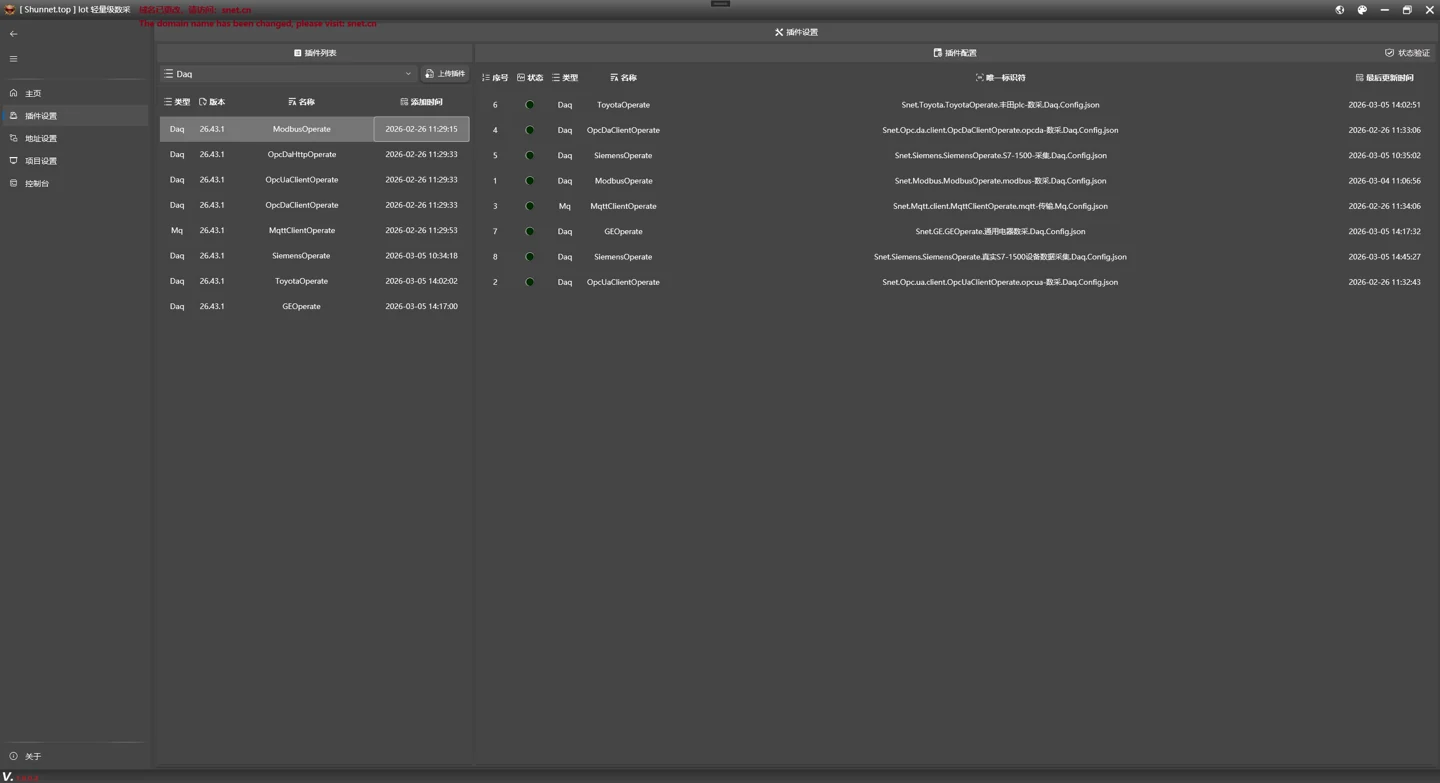 Daq desktop: plugin and connection configuration ↗
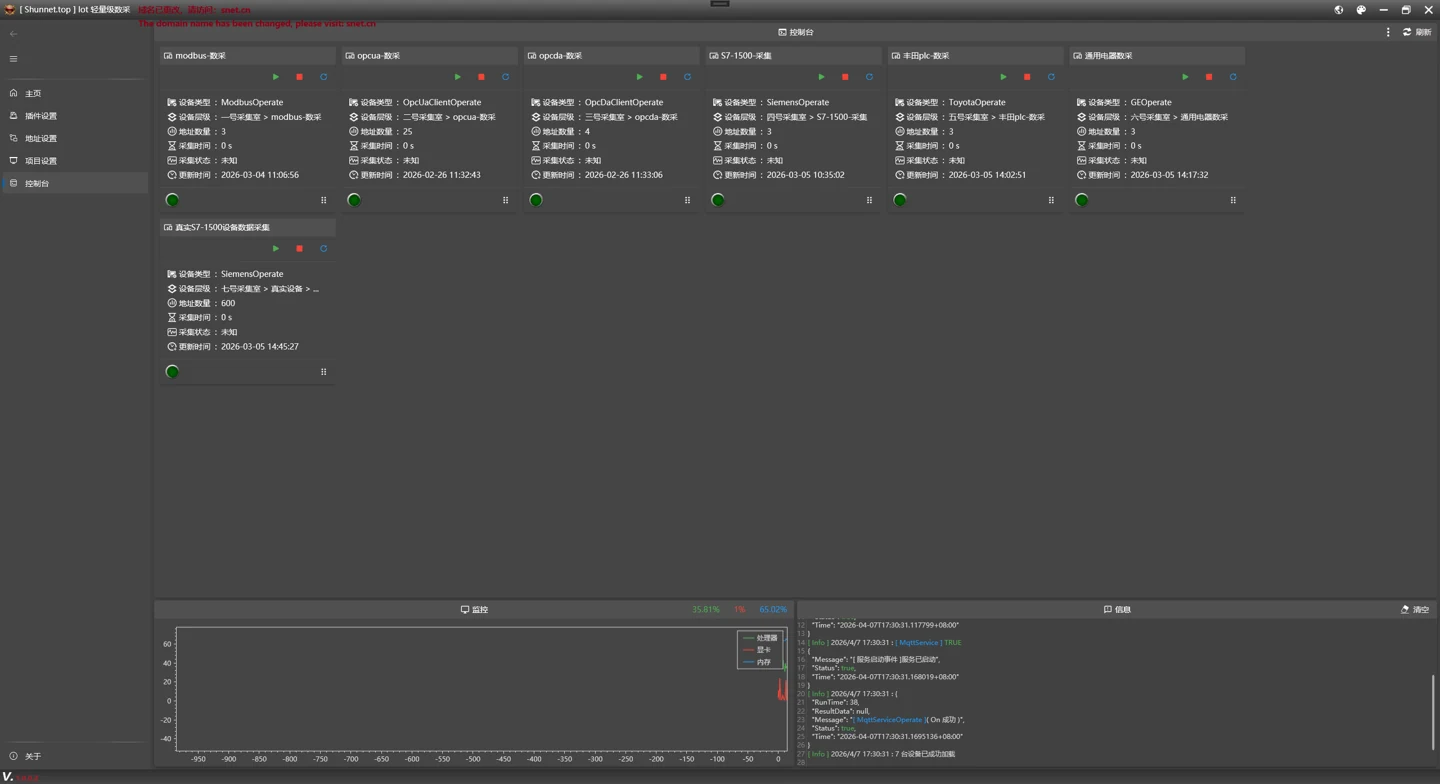 Daq desktop: acquisition console and live charts ↗
A .NET 10 industrial vision platform: YOLO recognizes objects and known defects, Anomalib locates anomalies, and SAM assists point-prompt annotation. Includes annotation, training, ONNX and joint validation, Windows / Linux web and API applications, and a Windows WPF tool. Core components integrate through source project references.
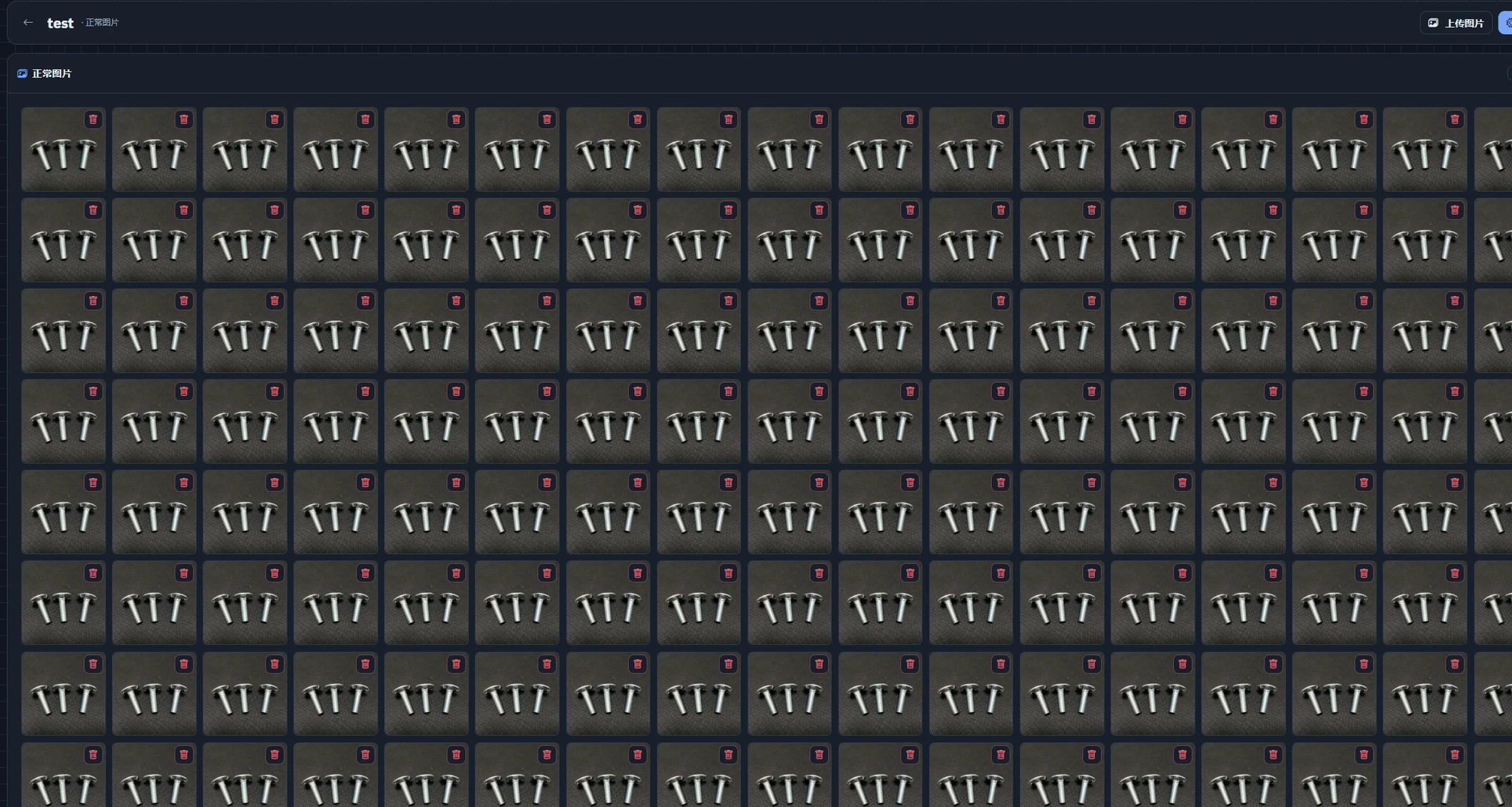 VisualIdentity: screw image dataset workspace ↗
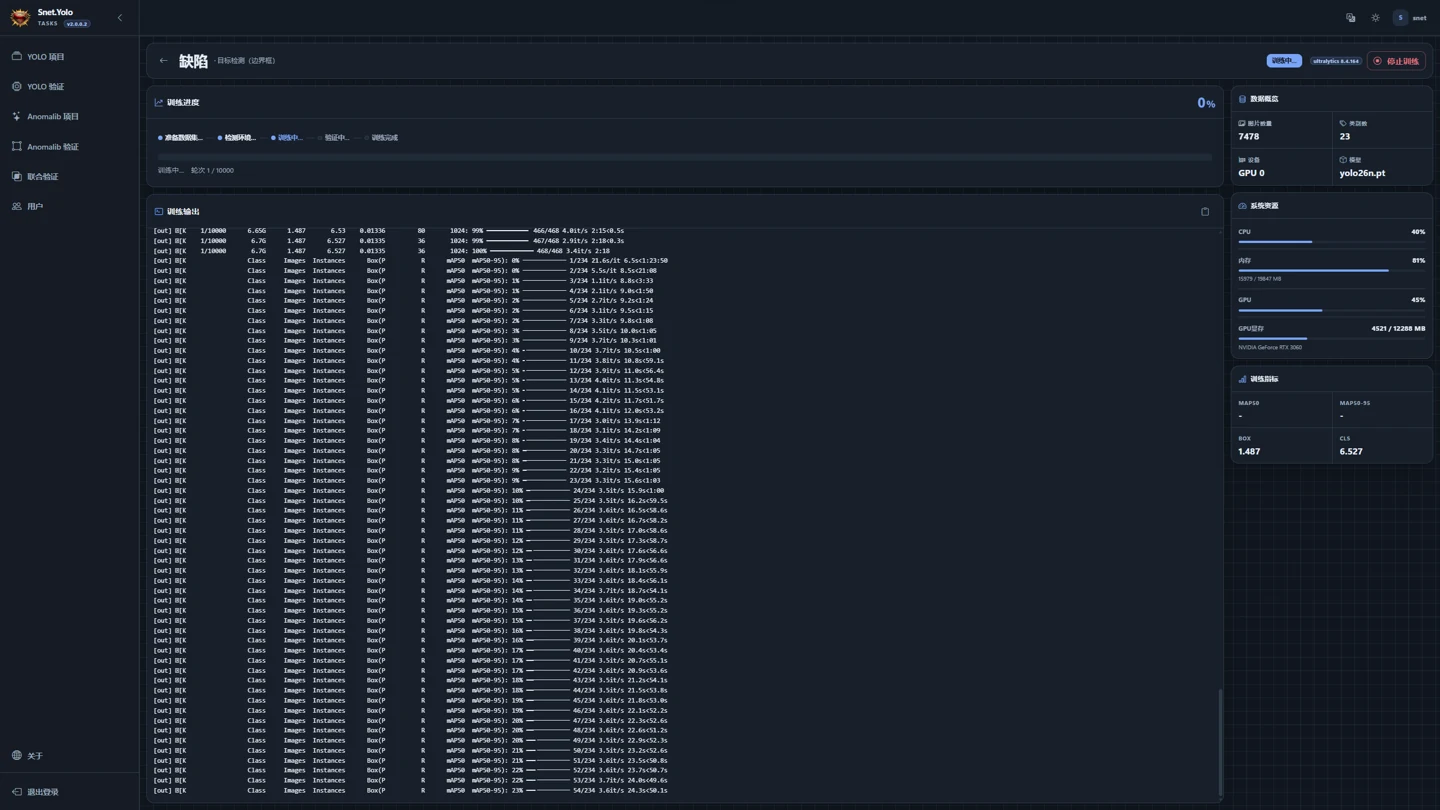 VisualIdentity: training progress and resource monitoring ↗
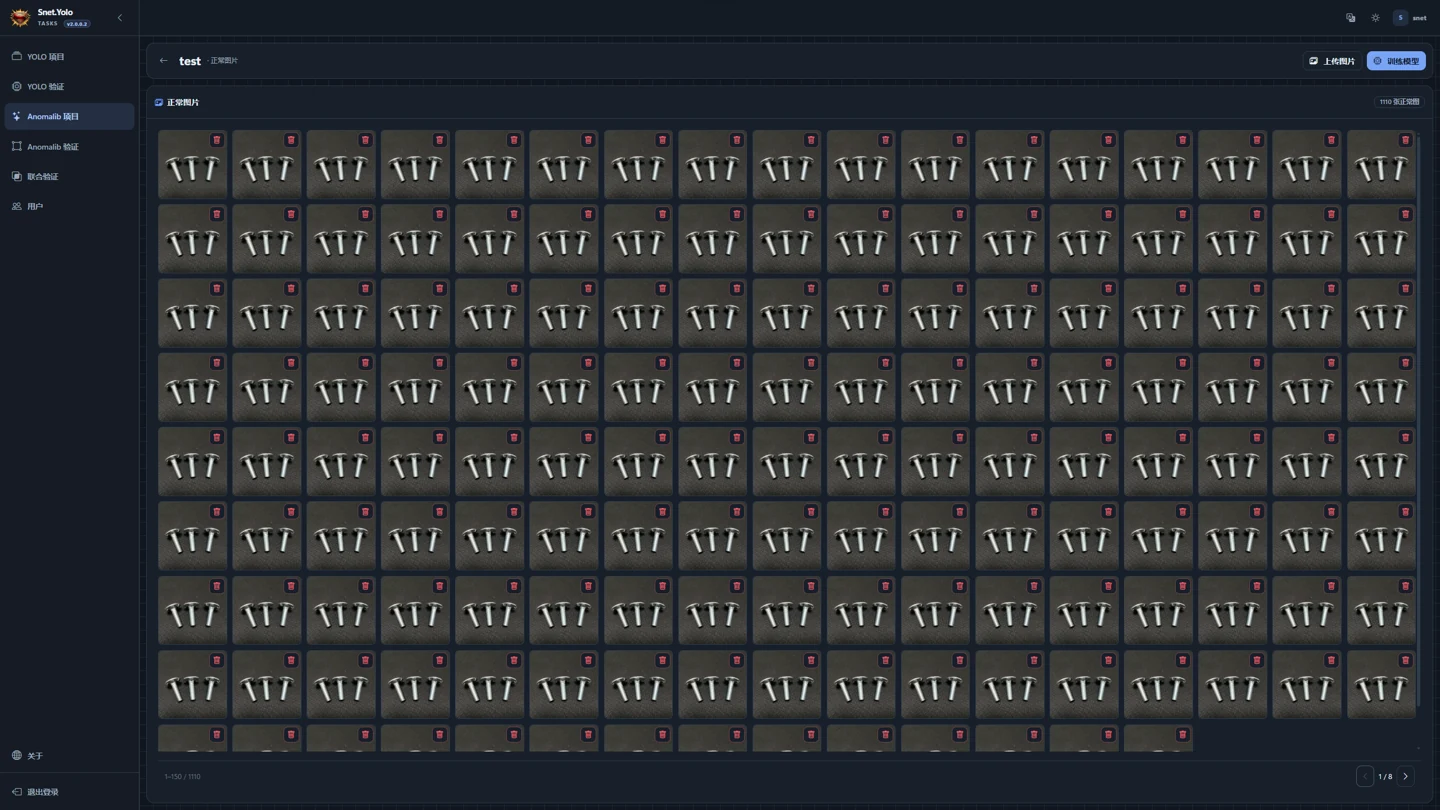 VisualIdentity: anomaly detection dataset management ↗
Interactive diagnostics for individual devices and protocols. Read/write data, manage subscriptions, test messaging, view charts and browse OPC UA nodes. Complements Daq's acquisition workflow.
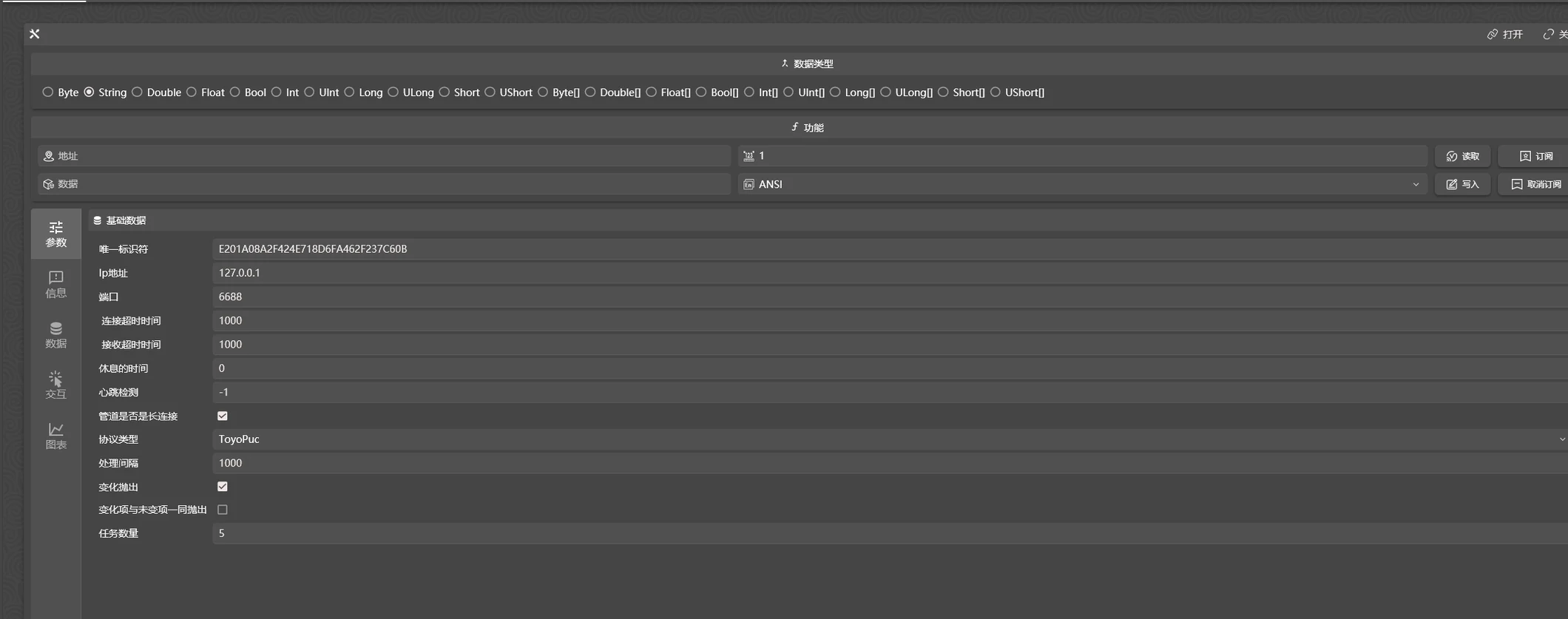 Debug: device read/write and subscription debugging ↗
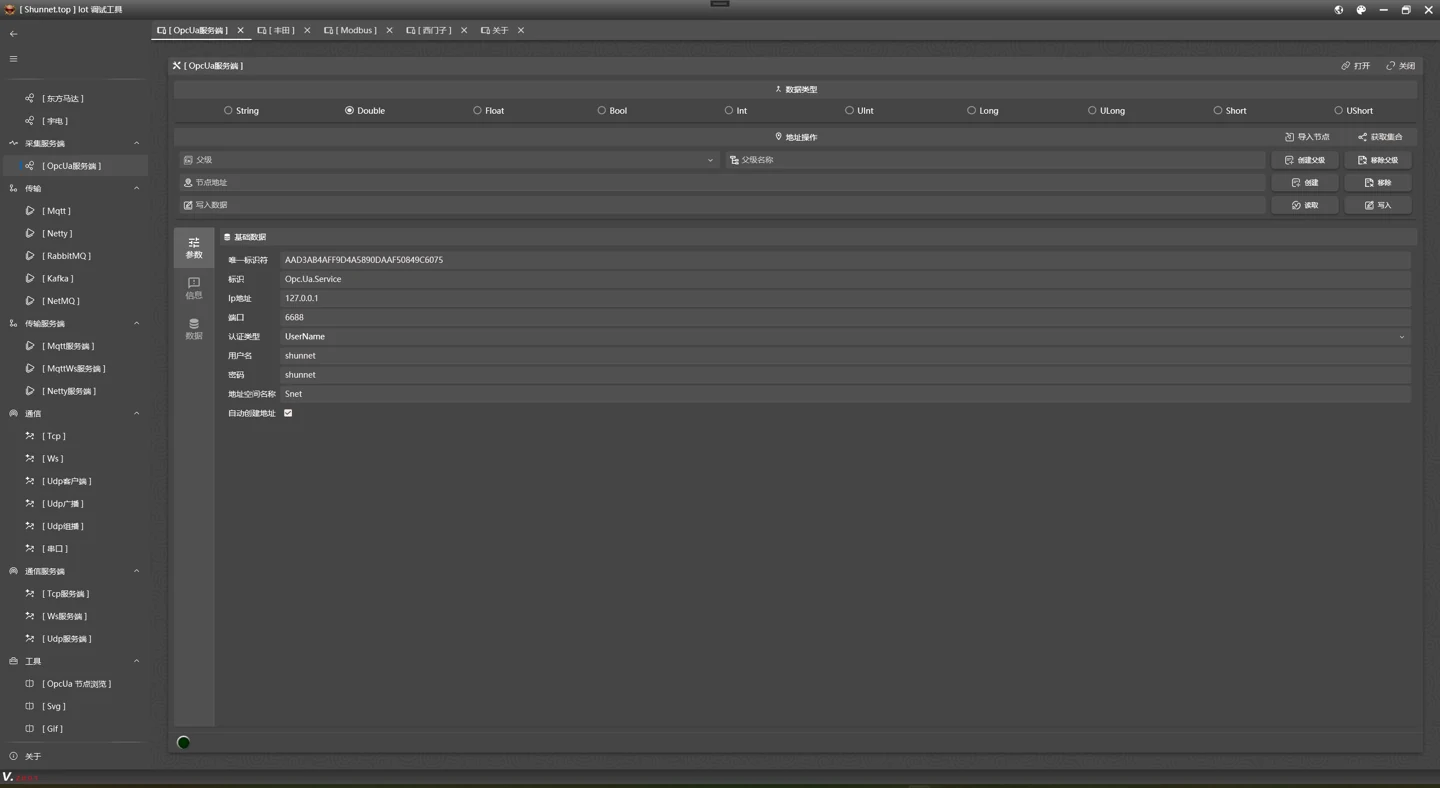 Debug: OPC UA server configuration ↗
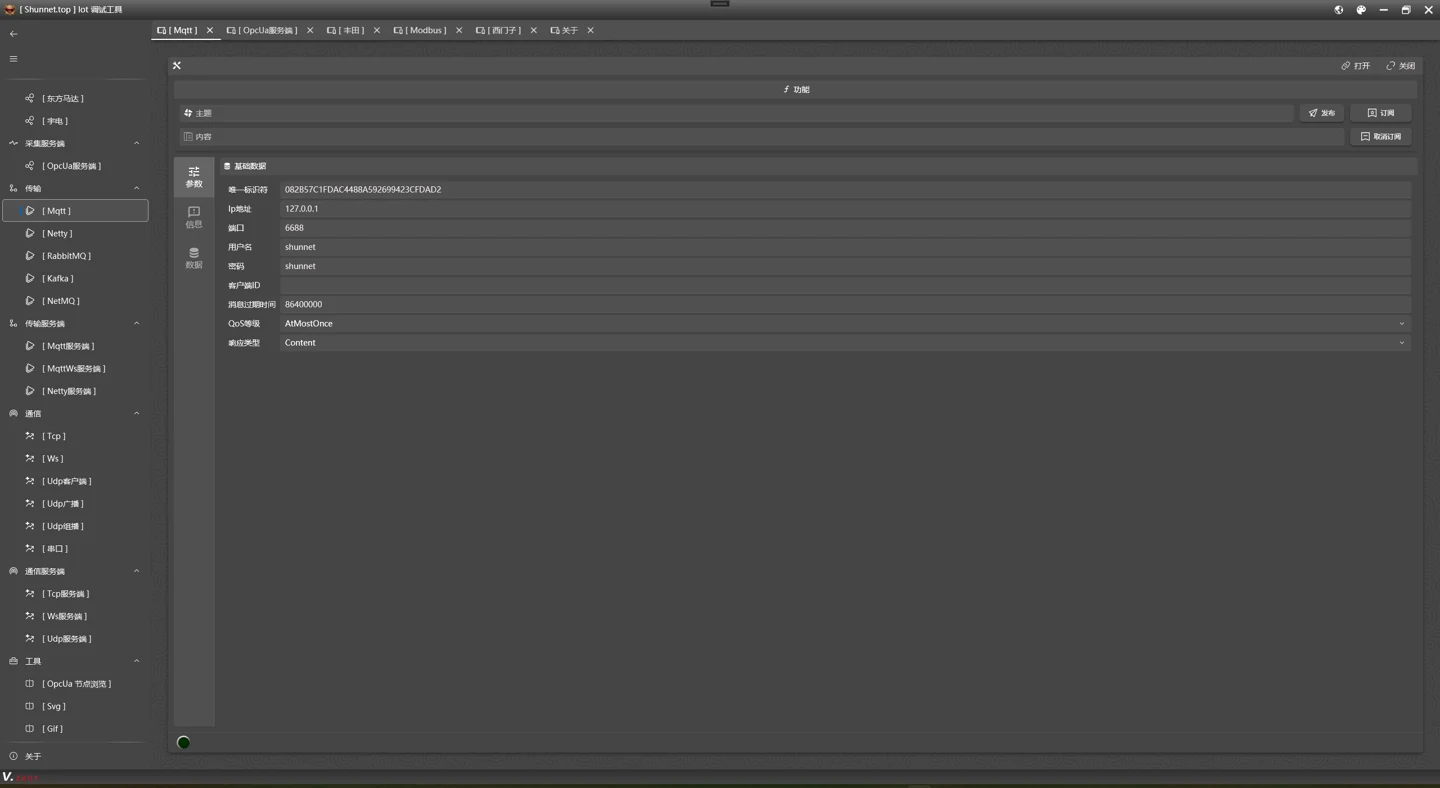 Debug: MQTT connection and messaging settings ↗
Modern WPF interfaces and application foundations: Snet.Windows.Core / Controls, MVVM, themes, Chinese/English localization, window base classes, property editors and common controls.
UI library · WindowsView sourceA .NET RPC library built on DotNetty, with service registration, client proxies and async calls. Includes server and client examples for process and internal service communication.
Service calls · .NETView sourceSnet.Redis wraps connections and operations for caching, sessions, state and publish/subscribe workflows. A shared entry point manages Redis access and common data structures.
Caching · .NETView sourceSnet reference examples organized into core, daq, relay, tep and web groups. Explore transports, acquisition, message forwarding, custom device access and WebAPI integration.
Examples · .NET 10View sourceA community source directory organized by author and daq / mq type. Share device access, custom acquisition and messaging plugins. Each plugin documents its interface, dependencies and host compatibility.
Plugins · IDaq / IMqView sourceFour skills for AI coding assistants, covering acquisition, messaging, IDaq / IMq plugins and WPF applications, with development workflows and interface contracts.
AI assistance · GuidesView sourceThese tools are independent of the industrial acquisition workflow.
A programmable keyboard and mouse simulator for Windows. Scripts combine keys, pointer actions, delays, loops and clipboard operations for repetitive tasks and desktop automation.
Automation · WindowsView sourceProvides an Ollama-compatible interface for GitHub Copilot, forwarding requests to DeepSeek / MiMo. Includes a Windows WPF manager for configuration, service controls and logs. See the README for model and IDE requirements.
AI tools · ProxyModels are provided by third-party services; read their terms before use.
View source11 applications, tools and ecosystem projects. Framework packages and application source have separate entrances.
Data updated · Current releases & repositories ↗
Start with the framework concepts, then follow protocol guides, source code and practical articles into your own use case.
Installation, configuration, the core engine, protocols, messaging, WPF and API references, available in Chinese and English.
Install, configure, connect, read and subscribe
Lifecycles, abstractions, events, caches and plugins
Vendor drivers, address rules, OPC and custom access
Connect MQTT, Kafka, RabbitMQ and other systems
Windows, controls, MVVM, themes and localization
Interfaces, results, addresses, enums and attributes
Da Shun's technical blog shares Snet projects, C# / .NET, WPF, industrial communication, vision applications and developer tools, alongside personal stories.
Daq, acquisition and forwarding, data parsing and custom plugins.
WPF libraries, themes, localization and .NET encoding issues.
VisualIdentity, YOLO applications and model proxy tools.
Read articles alongside the documentation for your installed version.
Snet AI Skills give coding assistants domain knowledge, interface contracts and development steps.
Connect a Modbus device, read registers and forward the data to MQTT.
// DAQ → MQTT
var value = await device.ReadAsync(address);
if (value.Status)
    await mqtt.ProduceAsync(topic,
        Serialize(value.ResultData), Encoding.UTF8);
Workflow illustration; generated output still needs review and testing.
Describe the device, addresses and destination to help generate acquisition code.
MQ-Skill ↗Build messaging code around brokers, topics and send/receive requirements.
PluginDev-Skill ↗Implement custom acquisition and messaging through IDaq / IMq contracts.
WpfUI-Skill ↗Combine windows, MVVM, themes, localization and controls.
Platform support follows each project’s documentation. Packages, source code and third-party components have separate license scopes.
| Component | Windows | Linux | macOS |
|---|---|---|---|
| Daq / VisualIdentity Web、API | Supported | Supported | Undeclared |
| WPF / Debug / KMSim | Supported | Unsupported | Unsupported |
| .NET communication libraries | Driver and dependency specific; OPC DA requires Windows COM. | ||
Applications mainly use .NET 10; libraries target .NET 8 / 10. See project documentation for driver and acceleration requirements.
Daq, Debug and VisualIdentity source is published under MIT, which permits commercial use under its terms. Framework packages are distributed on NuGet. Plugins, models and dependencies retain their own licenses.
| Component | Distribution & license |
|---|---|
| Snet.Modbus | NuGet package · MIT ↗The package license does not mean this site provides the framework’s core source. |
| Daq / Debug / VisualIdentity | GitHub source · MITRefer to each repository’s LICENSE. |
| Plugins, models & dependencies | Refer to the relevant repositories and upstream licenses. |
See the notices for plugin, model and dependency license references.
Example verification, platform support and licensing scope in one place.
| Example | Method | Result & scope |
|---|---|---|
| Modbus TCP | Local loopback simulator | Reads 1234; no physical PLC is connected. |
| Modbus → MQTT | Loopback simulation and MQTT receive assertions | Published; the receiver confirms the same address value is 1234. |
| Siemens S7 | Compilation check | Not connected to a physical PLC or S7 simulator. |
Compose provides a Modbus simulator and Mosquitto, with ports bound to localhost. Docker is unavailable in this verification environment, so the container stack has not been run.
Screenshots come from public project READMEs; architecture, scenarios and AI code illustrate workflows. Validate performance, hardware compatibility and generated code in your environment.
Framework packages are distributed on NuGet, while application source is linked separately. Dependencies, plugins and models have their own licenses.
Run the same local examples ↗Projects grow through code. Experience grows through conversation. Meet the author, follow updates and bring ideas to the factory floor.
At its core, Snet is an industrial communication and acquisition framework for .NET. Its ecosystem includes Daq, Debug, WpfMUI, VisualIdentity and related projects. Install packages in an existing application or start with public application source.
Use a NuGet protocol package to connect devices from an existing .NET project. Choose Daq for configurable acquisition and forwarding, Debug for interactive device diagnostics, VisualIdentity for inspection, and WpfMUI for desktop interfaces.
The framework is distributed via NuGet; Snet.Modbus package metadata declares MIT. This does not mean this site provides the framework’s core source. Daq, Debug and VisualIdentity publish source under MIT. Check plugins, model weights and dependencies separately; see the license table above.
Daq Blazor Web and VisualIdentity Web/API support Windows and Linux. WPF desktop apps, Debug, WpfMUI and KMSim require Windows. These applications do not declare macOS support. Check each driver’s dependencies; OPC DA requires Windows COM.
Pages and articles may use different update dates or counting scopes. Follow the documentation, APIs and references for your installed versions, and keep Snet package versions consistent.
For embedded device communication in a .NET system, evaluate protocol packages, APIs and platform dependencies. For configured acquisition and forwarding, evaluate Daq; for single-device troubleshooting, start with Debug. Choose for your protocols, deployment environment and maintainability, then validate with your own devices.
Open an issue in the relevant repository with your version, protocol, reproduction steps and necessary logs. Use the QQ group for discussion. The community project does not promise a response time. Keep passwords, keys and production connection details out of public reports.